Showing posts with label sponsored post. Show all posts

Family games night with XBox - Minecraft for families

Jun 2, 2017

While at 4 year-old kinder last year, my son went to two different Minecraft themed birthday parties. He'd never even heard of Minecraft but these other 4 year olds certainly had! By age four, he was apparently already out of the loop of the electronic game craze sweeping the nation.


This didn't phase me. I am very mindful when it comes to the amount and type of screen time that my children have and the idea of them sitting at a computer alone, staring at a screen, just didn't appeal to me. So, thoughts of my son also playing Minecraft were shelved.

That was until recently, when I was contacted to see if our family would like to experience the role that Xbox could play in our home - particularly for family bonding. This was an interesting concept as gaming consoles weren't really on my radar at that point, but family time and family bonding is always a big priority. With an enthusiastic thumbs-up from my husband and two children (aged 5 and 8), we agreed to give it a whirl.

Xbox One S system


As it turns out, some game consoles are not just game consoles these days. Where have I been? 

The Xbox One S system is a multi entertainment unit that you can use not only for your game playing, but for all your entertainment needs, including watching films, TV,  streaming Netflix, Stan, live TV, Foxtel Go, YouTube or Twitch. It's got it all, and better yet, with the Xbox One S, you can view a range of ultra-high definition 4K HDR content from specific BlueRay disks, a variety of content on Netflix and other apps, or select Xbox One games. What this means is that we are finally seeing the full capabilities of our television in 4K, and can I say, it is SO clear. 

I can't wait to get some new BlueRay movies and see the difference with ultra-high definition. Family movie nights just got a whole lot clearer!


Bring the family together for the ultimate family games night


We love family games night. We have a number of different card and board games that we rotate through regularly, and I love the different learning we can do together (often maths, problem-solving, reading, speaking and social skills), and most importantly, the family bonding that comes from spending time together. 

Of course, we all know that playing games can result in tears and tantrums (and not just always from the young kids), however, I think that working through conflict (sibling rivalry anyone?) and not always winning, are important parts of what children can experience and learn, from playing games together

Parents playing along with their children are at an advantage to be able to model and demonstrate how to deal with not coming first, things not going our way, being outwitted, outplayed and more. Social and Emotional skills are very important areas that children need to work on and develop over time.

Teachable moments while playing games together include:
  • how to lose gracefully 
  • how to be a respectful winner
  • how to work together 
  • how to solve problems
  • how to encourage others
  • how to play just for fun

With an Xbox One S in our house, one could be worried that this time and these teachable moments could be lost to the call of the screen, but quite to the contrary, we can still use it to bring everyone together. The difference is that instead of the children playing games alone, we all play together. We learn the games together, we come up with ways to include everyone, and we have a brilliant time together with all of the teachable moments of a traditional board game night.

When playing games together on the Xbox, there are 2 main formats that you could choose to play in:
  • Single player pass and play: Where one person plays at a time while the other family members watch and offer tips and encouragement.
  • Co-op mode: Where 2 or 4 players play together at the same time with their own controllers and characters.

Together as a family you can work out what sort of format is going to work best, depending on the game you've chosen to play. 

Minecraft Family Play


Our first foray into a family gaming night was with the ever popular, Minecraft. Finally I was going to get a bit more of an idea of what I've heard so much chatter about both online and at the school where I teach. I admit that I was curious to see the potential for learning and education within the Minecraft format.

Minecraft is an open-world game that promotes creativity, collaboration and problem-solving in an immersive environment where the only limit is your imagination. 

Using Minecraft from an education standpoint, could include anything from visiting an ancient civilisation and creating a setting for a story, to exploring math concepts using Minecraft blocks, practicing collaboration, problem solving, digital citizenship and leadership skills while designing experiments and demonstrating mastery. A platform like Minecraft can definitely inspire children and students to explore, create and learn.

Fun tips for playing together as a family in Minecraft:

Create family roles and responsibilities
– Have one person play the builder, one the miner and one the harvester. This helps to ensure everyone has a role to play and can teach important social skills around working together, collaboration and sharing. Mix it up regularly so everyone gets a chance to try something new.

Set a challenge – In creative mode (that's where we started), you have the freedom to do whatever you like. Having limitless opportunity can be overwhelming, especially at first so it's best to set a challenge of building something either separately or together, a train, a giant pumpkin or even a castle. Compare ideas and work together to find a solution to challenges. By working together kids can learn a range of problem solving skills.

Challenge idea: Work together to build the ultimate family home in just one hour. Have different people playing the roles of builders, miners and harvesters.

If you are all completely new to Minecraft (like we were), you will probably spend about an hour together just going through the tutorials, working out how everything works, what you have to do, how to control your characters, etc. There's plenty to read and to navigate so playing together as a family is great for assisting with all of this.

The next time you all play, then you can start with some family challenges like those suggested above.
Occasionally we let the children play together for a set time, under supervision and the agreement that cooperation is key and the game is over if they can't cooperate. The teamwork, encouragement and cooperation that's being displayed has been great and it's amazing how when children really want to do something, they are able to pull out all the stops!


Other family game ideas on Xbox One:


Lego Batman
With Lego Batman, you dive into the DC universe and experience the world in Lego. Here you need to work together to solve problems which require collaboration and talking, go on an adventure, fight evil characters and be the hero! Go family co-op with this game to solve the riddles of Gotham together and save the city of Gotham.

FIFA 2017
Set up the ultimate family tournament in FIFA 2017 by selecting teams, the stadium and favourite players and then battling it out to take the family crown!

Take it to the next level by connecting with friends and family around the world by setting up your own private club. With Clubs, you can create your own small gaming community of people you trust. This would really take a family game night up a notch (especially if you can convince your elderly overseas relatives to get on board too!).

Managing play time


And lastly, if I'm talking about screen time, then I have to also mention managing screen time. For me, it is important to be able to manage screen time for my children, so I am happy that this is nice and easy with Xbox. 

Through our Microsoft family account online, I am able to manage my children's account, including restrictions on games they'd be able to play (based on age, etc.), internet access and enforcing screen limits on both the hours and times of day that my children can play.


I can also get emails that update me on my children's use, allowing me to keep track of it. The picture above shows one of our Saturday night family game nights.. which I can see went over by 16 minutes, haha. Certainly makes it easy to monitor (and to prove to the children when they don't believe their time is up).

Do you play Xbox together as a family?


Happy playing,
Debs :)

{Disclosure: this post is brought to you by Xbox Australia. We were gifted an Xbox One S pack for our review. As always, opinions expressed in this post are my own and my families'.)


Look where else we are. Are you following along? :)
New Here? Subscribe to get all activities sent directly to you
Enter your email address:


Delivered by FeedBurner
Continue reading...


Help your child learn to read in 4 weeks for free!

Feb 4, 2016

This post is sponsored by ABC Reading Eggs and Nuffnang

For children to learn to read, they need to do just that. Read! They should be read with and to every single day. In addition to reading stories and words that we see in everyday life, there are numerous activities and games that children can play, in order to help further develop the essential keys to reading success;

  • phonemic awareness - hearing and manipulating different sounds in words
  • phonics - recognising the connection between letters and the sounds they make
  • vocabulary - understanding the meaning of words, their definitions and context
  • reading comprehension - understanding the meaning in text, and 
  • fluency - reading aloud with speed, understanding and accuracy. 

Continue reading...


10 fun school holiday DIY Projects for kids

Jan 4, 2016

The school holidays are a great time to have a go at some DIY projects with kids. Not only do they keep the kids occupied whilst learning new skills and experimenting with ideas, but they can create some really cool games and activities for very little cost.

This post is brought to you by Bunnings Warehouse and Nuffnang

My kids feel a real sense of pride and accomplishment from being able to take a bunch of simple objects and put them together in a way that creates something new.  This is what DIY is all about, creating and making things. As the number 1 destination for DIY, Bunnings is the place to go to get everything you need and their fun kid-friendly environment, with miniature trolleys, face painting, kids playgrounds and more, makes it the ideal location to pick up everything you need for your DIY projects with the whole family.

We recently discovered that the Bunnings website has a huge range of fun projects for the kids, with easy to follow video tutorials. Perfect for gaining inspiration and getting ideas for new projects! We've browsed through the kids DIY projects on their website and have made a list of 10 of our favourites! Here they are. (We've already made one of them and the kids think it's the coolest thing they've ever made!)
Continue reading...


DIY Disney inspired Christmas Gift-Tags for Kids

Dec 21, 2015


Christmas always ends up being such a crafty, creative time for my kids and I. We love hand-making Christmas cards, making fun Christmas food, playing with Christmas playdough and so much more! It's always fun jazzing up the gifts with our own wrapping paper, ribbons or gift-tags and what I love about it the most, is creating those magical Christmas moments together that will become precious memories over time.

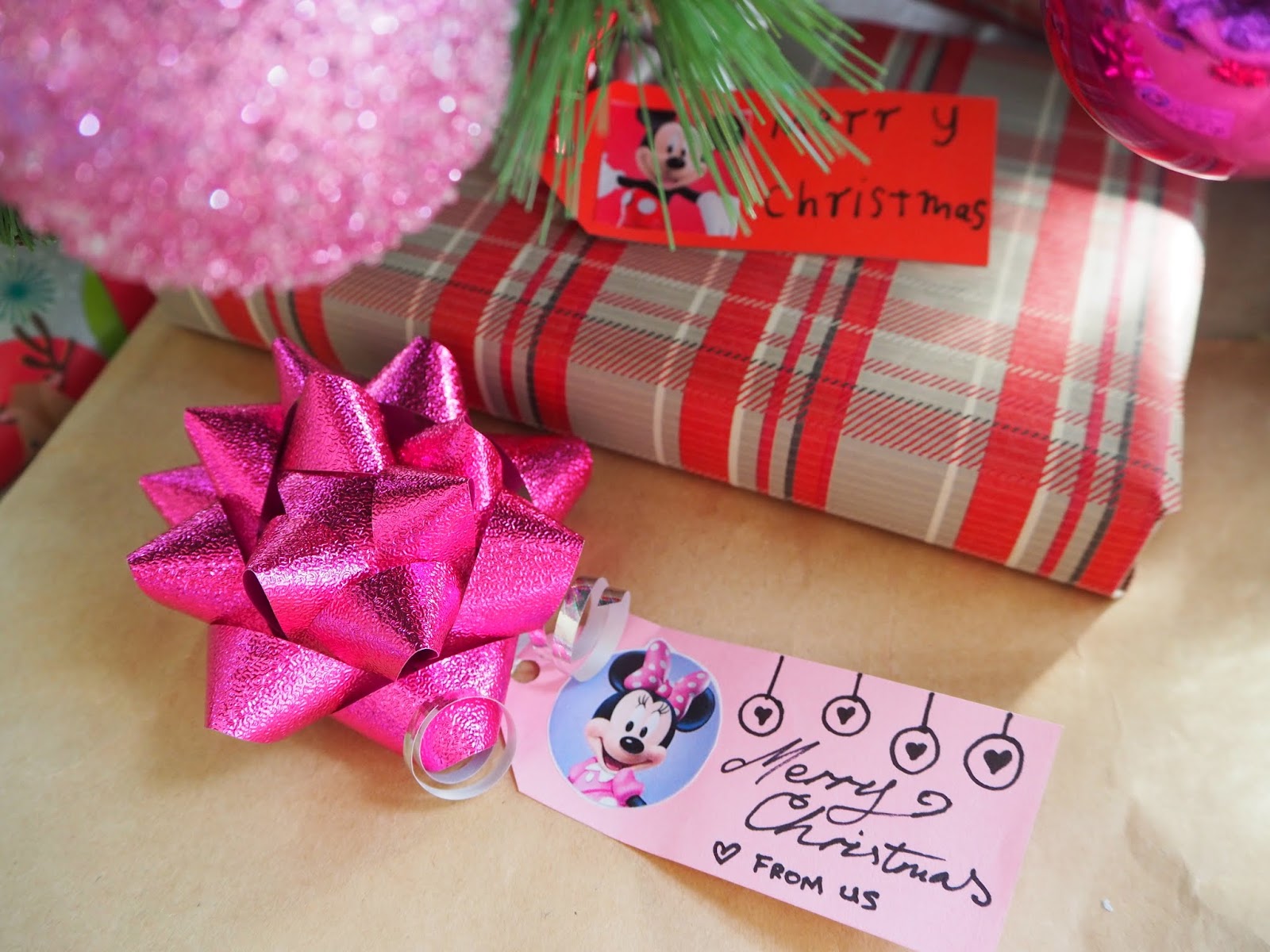
To get the kids excited in creating our Christmas gift-tags, we decided they would feature our favourite Disney Junior characters. Mickey and Minnie Mouse, (classic favourites) and Doc McStuffins, who we love for her healthy living messages and kind, caring nature.

Making the gift-tags ourselves allowed for the children to practice fine-motor skills, (it's not easy to trace and work with small items), cutting skills (this part was especially good for the younger kids) and even some reading and writing skills, in order to label the gift-tags. Younger children may need some assistance with the writing, or you could provide stickers or stamps that they could use instead.

Materials:
  • Blank gift tags or gift tag template and coloured cardboard (here is a free printable gift-tag template)
  • Scissors
  • Hole-punch
  • Marker
  • Glue
  • Ribbon
  • Fave Disney character pictures (we just printed some off the Disney Junior Website or you could always buy some stickers)
Either print our your gift-tags on the coloured card of your choice, or trace a plain template onto some coloured card. As we were using a few different characters, the kids wanted to match the colours of each character to the cardboard colour.
Cut out your gift tag.
Cut out your character picture.
Glue next to the pointed end of the gift-tag
Write or draw any greeting on your gift tag. You will also want to label who it is for and who it is from. You can put this on the front or the back.
Punch a hole near the point at the end of the gift-tag and then tie some ribbon through the hole.
Children can play around with the text and format for their gift-tag. It's a good idea to first provide children with a blank gift-tag so that they can practice their wording and the sizing of their text. Often trial and error works best for this.
When your gift-tags are done, coordinate them with matching coloured ribbons or bows and pop them on the presents for the lucky recipients.
There's just something about that homemade touch that makes them more special!

Disney Junior The Channel is where magical storytelling comes to life and is available on Foxtel, channel 709 and Fetch. I love that the Disney Junior characters and stories cover learning areas from early language and maths skills to healthy living and social and emotional development. You can use this inspiration for recreating your own Magical Christmas Moment with your little ones and share these with friends and family. Disney Junior Australia and New Zealand would love to see your ideas so be sure to tag in @DisneyJuniorAUNZ and #DJMagical Moments.

I've found that watching shows with familiar and trusted characters, that are promoting the same messages and values that we teach at home, can be very useful in helping children consolidate the knowledge and entice them to want to recreate the behaviours. 


Happy creating,
Debs :)

Look where else we are. Are you following along? :)
New Here? Subscribe to get all activities sent directly to you
Enter your email address:


Delivered by FeedBurner
Continue reading...


12 DIY Quiet Busy Games for Kids in the Car

Aug 18, 2015

Looking for ways to quietly entertain the kids on long road-trips? Look no further than this great collection of 12 independent road-trip activities that you can make yourself at home.

This post is sponsored by GT Radial Tyres and Nuffnang.

We spend a lot of time in the car. Usually just driving short distances between locations like school, the shops, friend's houses and home. Now that we have a caravan though, our road trips are becoming more frequent and the time we are spending in the car is increasing as we venture further and further away from home.

Driving is just a way of life for us but there are a couple of things that concern me about having my kids in the car. First and most important to me is their safety, as we all know how dangerous driving can be. I'm also aware of trying to keep my kids' minds active over long trips when they are unable to be physically active.
Continue reading...


Handy tips for recording childhood milestones and magical moments.

Aug 11, 2015

This post is sponsored by Disney Junior The Channel and Nuffnang

The saying, "The days are long but the years are short", feels all too true when you have children. There are some days that really feel like bedtime is never going to come, and then you blink and another year is over and your baby, who's now a child, is moving up in the world before you've had time to come to terms with it.

One of the biggest lies that I tell myself is, "I'll remember that". Unfortunately, these days, unless it's something absolutely major, if I don't write it down or have some sort of record of it, before too long, it's gone and forgotten. This is true for a lot of my children's milestones. I had a baby record book purchased or gifted to me with both my children and I hate to admit it, but they are both completely empty. (And my kids are soon to be turning 4 and 7!) Life just happened too quickly and all those little details of first this and first that, left my conscious memory before I got around to putting them all in the books!
Thankfully, because of my growing interest in photography over the years, I have captured most of the things that were actually important to me, like those first steps or first days of preschool. One day, when I have more time (so, I guess... never? haha) I can at least go back through my pictures and videos and seek out those special moments and include them in the books so that I can pass them onto my children as keepsakes.

There are plenty of ways that you can record your child's special moments and milestones. Here are some of my favourites as well as some handy tips to go along with them and a chance for your child to star on TV thanks to Disney Junior The Channel.

1) Capture moments on Video.


A fabulous way to record those magical moments is on video! These days the majority of people's mobile phones have video recording capabilities. Gone are the days when you had to lug around a large, specialised piece of equipment. Video recording is at our fingertips more than ever and whilst I love, love, love my pictures, I am starting to embrace taking more videos as there's nothing that can replicate those exact movements your child used to do, the way they sounded when they talked/sung or pronounced certain words or the complete joy and overall reaction they had as they experienced something great. Sometimes it's just the little things like their mannerisms, or how they use a certain inflection on words when talking, which can be missed in still photos and forgotten forever.

Tips: 
  • Small snippets are great. You can piece them together to create an overall picture of an experience with all the best bits. For example, if you're going on a boat ride with your kids, filming the entire hour round trip is just not necessary. A couple of minutes here and there can sum up the whole experience quite easily (and you're more likely to find time to watch back smaller clips, than hours and hours of video at a time). In my video above, which is from our recent family holiday to Vanuatu, we spent a lot of time playing and not much time filming, so I didn't have a lot to work with. I've took a few short clips of video and a couple of photos and popped them together. For the purpose of sharing here, I added a bit of generic music to make it seem a bit more fancy. Not too shabby and gives a nice little snippet whilst being under a minute long.

  • Video editing isn't as scary as it seems. The idea of editing videos was a bit scary to me at first but having a bit of a play around with it you discover it's not that tricky to do. There are tons of different editing tools you can use. I just use the free editing software that came with my computer and there are a number of free ones online as well.

  • Get down on their level. Your videos will look a lot better if instead of always filming from above, you get the camera down to the level of the children.

  • Chance to Star on TV! Disney Junior The Channel are currently calling for submission of your recorded magical moments for a chance to be part of a special video they are creating. Upload your video on their facebook page and see more details at the bottom of this post.

2) Take Photos.


Whether you have a basic point-and-click, a fancy-shmancy DSLR or a smart-phone, there aren't many of us without access to a camera these days and it's likely that most of us are carrying one around with us everywhere! Whilst I definitely believe that we shouldn't be viewing our entire children's lives through a screen and that it's important to also be in the moment with your children, snapping a few quick shots here and there isn't likely to interfere too much with that and you will cherish all those memories down the track.

Tips: 
  • No need to always pose. Whilst I love a good group shot, posed pic and to see happy, smiling children, the photos that are my favourite are actually those that are just capturing real life. No need to stop your child so that they're looking at the camera or smiling for the camera, instead just take the time to observe your children in their natural state and wait for opportune moments to snap a few pics. Natural smiling and laughter always make for better pictures than forced smiles. (If you do want to pose though, like in the picture above, saying funny things to get your child to laugh will generally result in a more authentic smile than if you just ask them to smile)

  • Remember real life. You probably won't end up framing your pictures of the toy explosion that took over your living room or your gigantic mound of washing, but these pictures will make you smile and bring back floods of memories in years to come. So, don't forget to snap up bits of everyday life as well.


  • Quality isn't everything. It's funny how often I am trying to get "that perfect shot" and yet there's a limit to how many pictures I can actually get printed and framed and display around the house or gift to relatives. Not every photo has to be one that's good enough to print or share on facebook. Some of my very favourite photos to look back on (like the pic above) are ones where we're not dressed properly or the photo is blurred, etc., because these photos bring back memories of happiness.

  • Shoot in natural light where you can. Photos just generally look better in natural light. Sometimes, even when it's dim inside our house, I will still snap a photo with no lights or flash on as I can easily lighten the photo with an editing tool if it comes up too dark.

  • Avoid zoom. Unless you have a tripod or an extremely steady hand, I'd avoid zooming in on your photos and instead just try to get closer. With a high resolution picture, you can often take the pic from a distance and then crop it to show the parts that you want anyway. You will generally get a better result than if you're trying to take photos on zoom... especially of children that are unlikely to be staying still!

  • Add a sign to milestones. Adding little signs written on paper, whiteboards or chalkboards makes for a really fun little photoshoot and is something that can easily be replicated year after year as the children grow. That one consistency in the pics is what will make them seem really special.


3) Make a Memory Jar


A fun way to get the whole family involved in recording magical moments is with a family memory jar. You can easily make a memory jar out of a recycled glass jar. Each night at dinner, each family member can recall something special from the day which can be written on a slip of paper and slotted into your memory jar.  At the end of each year, it's lots of fun to go back through the jar together and recall all the fun and joy experienced during the year.

Tips:
  • Keep up with it. If recording memories each day is too hard to keep up with, you could do it at a family dinner once a week instead, or just have family members add in their special moments as they come up.

  • Holiday Memories. Some people make "Vacation Jars" which work on a similar premise to a memory jar. In your vacation jar, store pictures, memories, pamphlets, souvenirs etc. from your family holiday. A new jar for each new holiday. Lots of fun to empty and look back on.

4) Display special Artwork


Children's drawings are so special. It is fascinating as a parent to watch the progression in their skills and how their drawings change over time. Obviously we can't keep every single thing they ever doodle, but keeping and framing a few special ones over the years is another lovely way to bring back precious memories.

Tips:
  • Frame it! It's amazing how adding a nice frame to a child's artwork can suddenly make it feel worthy of hanging in the Louvre.

  • Photograph it and make into a book. If you're a bit like me and really struggle with throwing out your children's precious drawings, take a quick photograph of it and then dispose of it without guilt. Keep a folder on your computer labeled "kids drawings" and then file the photos away in there when you go through them. You can turn them into a little slide show to show your child their inner Piccaso, or better yet, use an online printing service to turn them into a photobook. This makes a great coffee table book and I'm sure the Grandparents would love a copy too.


5) Make a journal or scrapbook.


If you're the creative type and find things easier if they're written down in hard copy, then making a journal or scrap book of memories could be right up your alley.

Tips:
  • Make sure to set a time once a week or once a month to add to your book or you might find time slipping away and it's hard to keep up with.

  • Include pictures, little scraps of material from favourite clothes, quotes from your child and any little memories you want to remember.

6) Use a Tracking app.


Whilst I've not personally used any, milestone tracking apps are the way of the future and look like they could be quite handy at helping you remember certain events and dates. There are a number of different apps and this article from Kidspot gives the low-down on a few.

7) Use Questionnaires.


Questionnaires and surveys are a great way to record a little insight to your child's personality, interests, likes and dislikes at a certain period of time. They are easy to make. Simply write a list of questions and have your child answer them. Before your children can write, you can record what they say and then as they get older they can write in the answers themselves. It's great to use the same set of questions over the years to see how their answers change or remain the same over time.

Tips:
  • You can find plenty of examples and even free printables of kid surveys on the internet. Pictured above is an example of a questionnaire we've used in the past.

  • As your children get older, you can of course add in new questions or reword questions to suit their age.

8) Social Media. 


Most of us are using some form of social media these days and sharing photos is often a big part of this. Uploading your pictures online is not only a nice way to keep friends and family in the loop of what the kids are up to, but can also be very handy when it comes to storing, recording and printing. One of my very favourite social media sites is Instagram. It's quick, easy to use and is a great way to record day-to-day goings-on, milestones and magical moments. The bonus of using Instagram is that there are a number of easy, online printing services and apps that allow you to print a whole range of fabulous products, direct from your Instagram photos.

Tips: 


  • Privacy. With all social media sites can come the concern with privacy. My general rule of thumb is that if I'm not comfortable with everyone or anyone seeing it, then it's probably best to keep it off the net entirely. You can, however, ensure that your photos online are kept private or only viewed by the people that you are happy to see them by adjusting the privacy settings in your various social media sites. On Instagram you can have your profile either public or private and if private, your photos will only be viewed by those people that you've allowed to follow you. On Facebook you can go as far as changing the privacy of each photo you upload to allow it to be seen, or not, by whomever you wish.


  • Your chance to be featured on Disney Junior!

    Disney Junior The Channel is the place where Magical Storytelling is brought to life for kids aged 2-7 and is available on Foxtel (channel 709). They are currently celebrating the magical moments that we share with our little ones and are asking YOU to submit your family's Magical Moments on video via their Facebook Page for a chance to see your little ones on TV, on Disney Junior The Channel!

    To enter, simply upload your video to the Disney Junior Australia & New Zealand Facebook page by Sunday 23rd August (hurry, just 2 weeks!) and tag in #DJmagicalmoments. From the submissions, Disney Junior will then be developing a celebration video to be aired on Disney Junior The Channel and shared socially via digital media, including Facebook and YouTube. You can see all the details at DisneyJunior.com.au/moments.

    Go here to upload your video.

    What are your favourite ways to record childhood?

    Happy recording,
    Debs :)

    {Disclosure: this is a paid post for Disney Junior The Channel sponsored by Nuffnang. As always, opinions expressed in this post are my own.}

    New Here? Subscribe to get all activities sent directly to you
    Enter your email address:


    Delivered by FeedBurner
    Continue reading...